Quick Start
Install and Launch
Section titled “Install and Launch”Download API Test Base 0.40.5 from the release page.
The macOS release comes as two dmg files: mac-arm64 for Apple silicon, and mac-x64 for Intel.
Double click the dmg and drag API Test Base.app to your /Applications folder.
Then open it from Launchpad or the Applications folder.
Download API Test Base 0.40.5 from the release page.
The Windows release comes in two forms: a setup installer and a portable zip. Pick the one you prefer.
The setup installer walks you through installation; leave the Run API Test Base checkbox ticked on its final wizard screen, so ATB starts when you click Finish. The portable needs no installation — extract the zip and run API Test Base.exe in the extracted folder to launch ATB.
In either case, the first time you run it Microsoft Defender SmartScreen may warn you. If it does, click More info on the dialog, and click Run anyway to proceed.
If you are using Docker Engine (Linux only) or Docker Desktop version 4.34 or later, the recommended way to launch API Test Base is with host networking.
docker run -d -t -v /data/folder/on/host:/atb/data --name apitestbase-0.40.5 --net=host apitestbase/apitestbase:0.40.5Notice: Replace /data/folder/on/host with your own value, so that your data can be retained on the host machine when the container is deleted. For example (Windows host):
docker run -d -t -v C:\Users\your-username\AppData\Roaming\ApiTestBaseDocker:/atb/data --name apitestbase-0.40.5 --net=host apitestbase/apitestbase:0.40.5If not using host networking
// Windows or macOS hostdocker run -d -t -v /data/folder/on/host:/atb/data --name apitestbase-0.40.5 -p 127.0.0.1:8090:8090 apitestbase/apitestbase:0.40.5
// Linux hostdocker run -d -t -v /data/folder/on/host:/atb/data --add-host=host.docker.internal:host-gateway --name apitestbase-0.40.5 -p 127.0.0.1:8090:8090 apitestbase/apitestbase:0.40.5
Once the container is running, open http://localhost:8090/ui in a web browser on the host machine.
If you use the docker container in CI/CD pipeline, call ATB’s own API (with HTTP command line tool like curl) for API test automation. Open http://localhost:8090/apidoc on host machine for checking the Swagger UI. For a full walkthrough, see Integration Unit Testing Automation in CI/CD Pipeline.
Download apitestbase-0.40.5-allos-nojre.zip from the release page.
This build is for running ATB on any OS where Java 21+ has been installed. To run the ATB, extract the downloaded zip, and run the start.bat (on Windows) or start.sh (on macOS or Linux).
It is typically used in CI/CD pipeline where you call ATB’s own API (with HTTP command line tool like curl) for API test automation. Open http://localhost:8090/apidoc for checking the Swagger UI. For a full walkthrough, see Integration Unit Testing Automation in CI/CD Pipeline.
You can also use it (on page http://localhost:8090/ui) for requests or test cases creation, but it opens a terminal window which might not be the best UX.
Ad Hoc Invocation
Section titled “Ad Hoc Invocation”With ATB running, let’s send a quick ad hoc request to get familiar with the UI.
Right click anywhere on the left side pane, select New Request > HTTP, give it a name and press Enter. The request is created.
In the request edit view, under the Invocation tab, enter a URL like http://localhost:8090/api/articles (an API Test Base bundled API) and click the Invoke button.
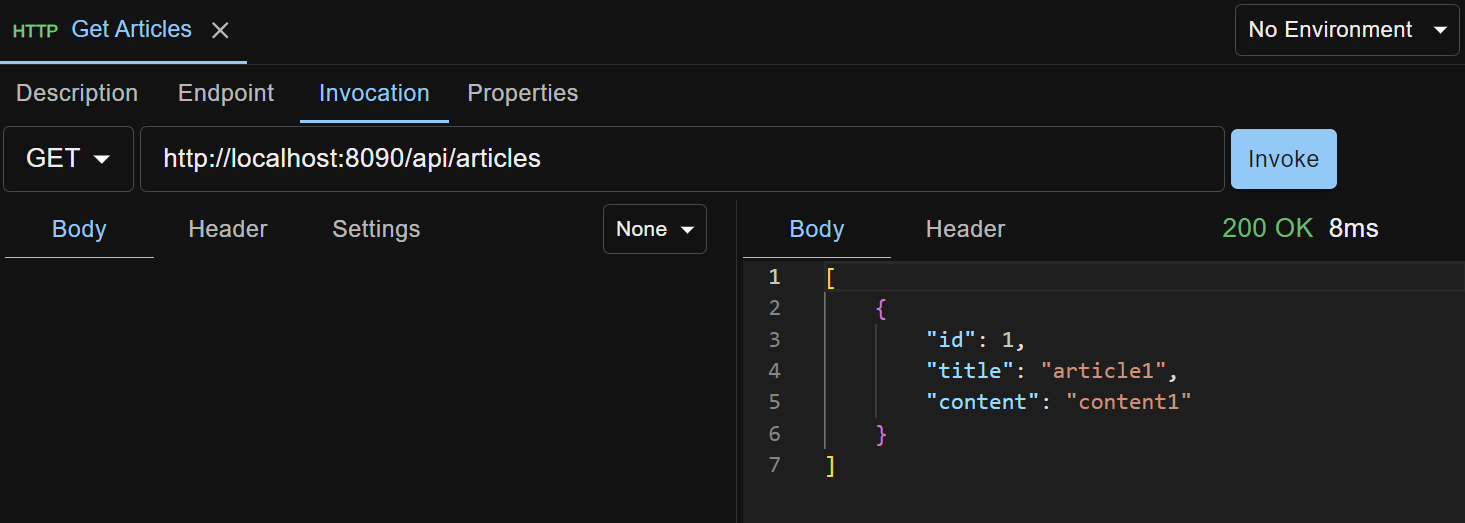
The request, as well as all the data you create in API Test Base, is automatically persisted on your local machine. No Save button.
Docker users: when not using host networking, reach an API running on your own machine (the Docker host) with host.docker.internal instead of localhost in the request URL.
Next Steps
Section titled “Next Steps”You’ve run an ad hoc request. Next, build a structured test case that invokes an API and verifies its side effect — see Creating an Automated Test Case.